I implemented a custom Time picker, which is based on a HorizontalScrollView. You can choose a time while scrolling within the last three weeks.
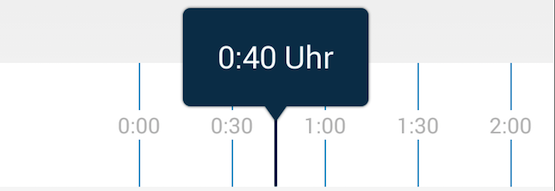
To populate the HorizontalScrollView, I wrote a custom ArrayAdapter. But I realized, that the getView() method of my adapter is called for every item on startup, instead of reusing the cells.
I realised that I add all the Views in my HorizontalScrollView (#1)
InfiniteTimeScrubberHorizontalView extends HorizontalScrollView{
...
public void setAdapter(Context context, TimeScrubberListAdapter mAdapter) {
    this.mAdapter = mAdapter;
    try {
        fillViewWithAdapter(mAdapter);
    } catch (ZeroChildException e) {

        e.printStackTrace();
    }
}

private void fillViewWithAdapter(TimeScrubberListAdapter mAdapter) {
    //...

    ViewGroup parent = (ViewGroup) getChildAt(0);

    parent.removeAllViews();
    for (int i = 0; i < mAdapter.getCount(); i++) {
        parent.addView(mAdapter.getView(i, null, parent));   //#1
    }
}
Here's the adapter
public class TimeScrubberListAdapter extends ArrayAdapter<String> {

//...
private ArrayList<String> list;  //list from 0:00,0:30...23:00,23:30
final static int MAXIMUM_DAYS = 21


@Override
public int getCount() {
    return list.size() * MAXIMUM_DAYS;
}

@Override
public String getItem(int position) {
    return list.get(position % list.size());
}

@Override
public View getView(final int position, View convertView, ViewGroup parent) {
    RelativeLayout layout;

    if (convertView == null) {

        layout = (RelativeLayout) View.inflate(context, layoutId, null);

        holder = new Holder();

        holder.title = (TextView) layout.findViewById(R.id.epg_item_text);
        layout.setTag(holder);

    } else {
        layout = (RelativeLayout) convertView;
        //Log.i("MOSCHE","convertView is NOT NULL");
        view = layout;
        holder = (Holder) layout.getTag();
    }


    layout.setLayoutParams(mLP);

    String timeValue = getItem(position);
    holder.title.setText(timeValue);

    return layout;
}
//...
My question is: How do I have to change my adapter, that it is only adding the visibile cells at the beginning, and reuses the convertViews afterwards?

0 comments:
Post a Comment