I'm building a Cordova app and I'm wondering why I'm seeing the same font render differently between the Chromium WebView (embedded in the cordova app) and on the Chrome app on Android 4.4.2.
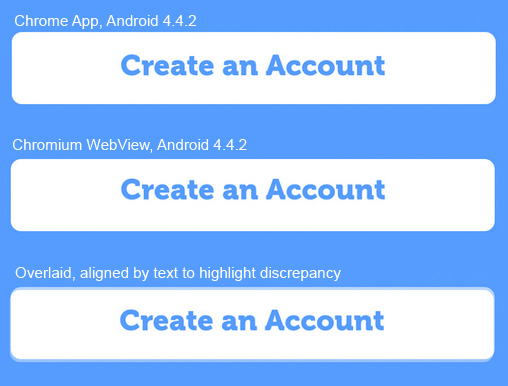
As you can see, the WebView version seems to bump up the font by a few pixels. Here's the computed styles:
-webkit-font-smoothing: antialiased; -webkit-user-select: none; background-color: #FFF; border-bottom-left-radius: 7.5px; border-bottom-right-radius: 7.5px; border-top-left-radius: 7.5px; border-top-right-radius: 7.5px; color: #4F9EF7; cursor: pointer; display: block; font-family: Museo-900; font-size: 20px; height: 50px; line-height: 50px; overflow-x: hidden; overflow-y: hidden; padding-left: 20px; padding-right: 20px; position: relative; text-align: center; text-overflow: ellipsis; visibility: visible; white-space: nowrap; width: 295px; z-index: 0;
Why would they render differently if they're backed by the same technology? How might I even detect the different environments and style accordingly?

0 comments:
Post a Comment